Joystick Diagrams reads configuration files from your games and tools, and automatically generates hardware-accurate reference cards for your HOTAS setup. No manual data entry. No design skills needed.
Sound familiar?
A decent HOTAS setup costs $100 to $1,000+. A typical rig has 50 to 100+ bindable controls across a stick, throttle, pedals, and button boxes. Every aircraft or ship has different bindings. Documenting it all is a nightmare.
Joystick Diagrams reads your game configuration files directly and generates accurate, layout-matched diagrams of every button, axis, and hat switch on your controllers.
No manual data entry.
No design skills needed.
Always in sync with your actual bindings.
Workflow
Install the app, then install the plugins you need from the built-in store. Point each one at your game or tool's config folder. Every profile and device is discovered automatically, no manual entry.
Setup GuideBrowse all your profiles and devices. Rename verbose action names with your own labels. Hide devices you don't need for a particular aircraft. Configure profile inheritance.
See FeaturesChoose a template for each device. Pick SVG for print-perfect quality or PNG for sharing on Discord and forums. Batch-export your entire fleet in one click.
Browse TemplatesThe end result
A hardware-accurate reference card with every binding placed exactly where the button sits on your controller. Print it, pin it to your desk, or pull it up in a VR kneeboard.
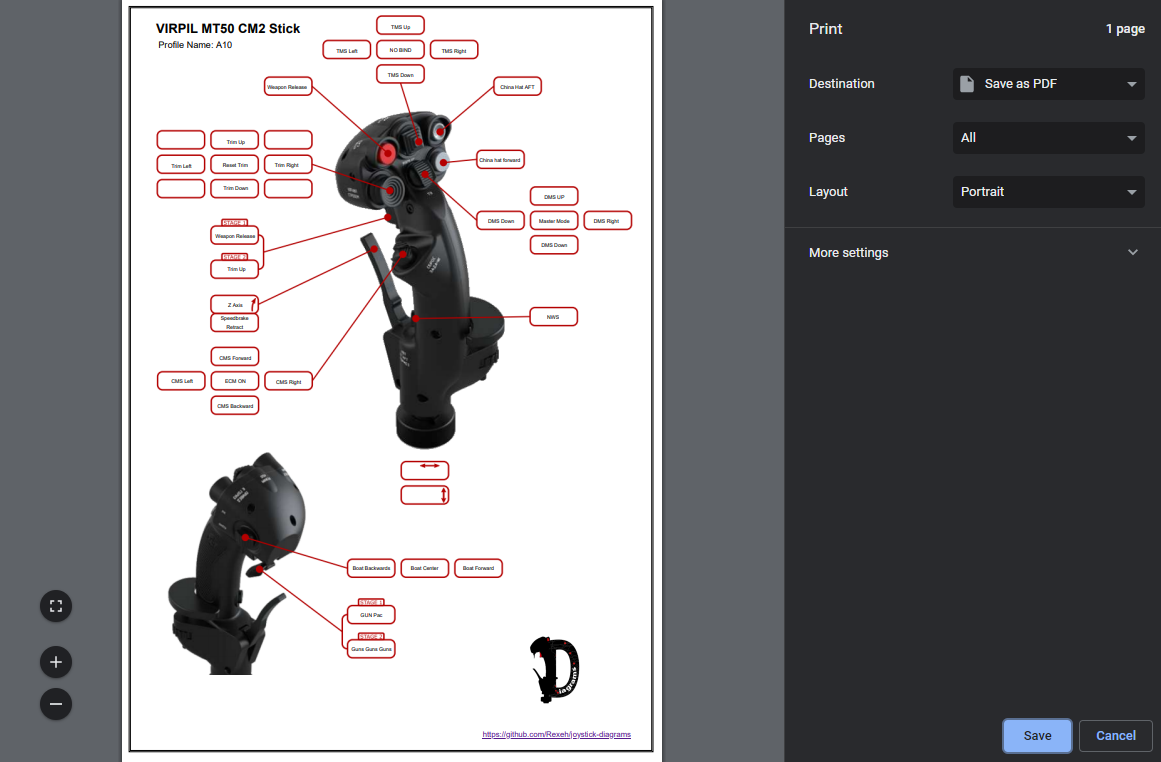
Every button labelled
Bindings placed on the exact physical location
Print-ready quality
SVG output scales to any size without blur
Generated automatically
Zero manual layout work required
Features
Automatic import, custom labels, batch export. Less time documenting, more time flying.
Plugins read configuration files from your games and tools directly. Point the app at your config folder and every binding is extracted automatically.
Ships with a number of templates for popular joysticks and throttles
Override default game action names with your own labels, set once and stored
Export as SVG and/or PNG for printing or use in tools like OpenKneeboard
Join plugins together, make your DCS profiles inherit keys from Joystick Gremlin to create single pane view of your joystick.
Fully documented API, build your own parser and export plugins and we'll help users find them!
No subscriptions, no paywalls, no ads. Built and maintained by a sim pilot, for sim pilots.
Games & simulators
DCS World, MSFS, Star Citizen, IL-2, Falcon BMS, Elite Dangerous, and Joystick Gremlin. One tool for all your sims.

DCS World
Per-aircraft profiles + modifiers

Microsoft Flight Simulator
MSFS 2020 full binding import
Star Citizen
ActionMaps + modifier support

IL-2 Sturmovik
Great Battles series
Falcon BMS
Community plugin by Crash331
Elite Dangerous
Community plugin by DiscountDarcy

Joystick Gremlin
Device-level bindings, outside any game
More via plugins
Open plugin API
84 templates covering 12 hardware brands
Pilots sharing templates, setups, and help across DCS, MSFS, Star Citizen, and IL-2. Plus development updates and early builds.
Common questions
Yes. Completely free and open-source. No premium tiers, no subscriptions, no ads.
Official plugins cover DCS World, Microsoft Flight Simulator 2020, Star Citizen, and IL-2 Sturmovik: Great Battles. Community plugins add Falcon BMS and Elite Dangerous. Joystick Gremlin is supported as a tool: it operates at the device level outside of any game, so its profiles complement your game profiles for a complete binding picture. Plugins install from the store inside the app, and anyone can publish a new one.
45 templates ship with the app, covering Virpil, WinWing, VKB Sim, Thrustmaster, Saitek/Logitech, CH Products, and Total Controls. Another 39 have been shared by the community, and a starter template lets you create layouts for any device not yet covered.
No. The app reads your configuration files directly, from games and tools alike. Point it at the right folder and your bindings are imported automatically.
SVG (infinitely scalable vector graphics, perfect for printing at any size) and PNG (2x high-resolution raster images, ideal for sharing on Discord, forums, and as stream overlays).
The app runs as a desktop application. The diagrams it produces can be printed for desk reference, displayed on a second monitor, or used with in-VR kneeboard tools like OpenKneeboard.
Yes. A starter template is included that you can customise in draw.io (a free diagramming tool). You can also request or contribute templates via the Discord server.
Some plugins have import options. DCS World has a toggle to exclude simplified easy-mode aircraft variants so training profiles don't clutter your list. All options are set through the app UI. No config file editing.
Yes. Override any game action name with your own text via Custom Labels. "Weapon Fire Primary Mode Toggle" becomes "Guns". Labels persist across sessions and apply everywhere that command appears.
Discord is the fastest way to get help. You can also open issues on GitHub.
Still have questions? Ask on Discord.
Free. Open-source. No account needed.
Download Free for WindowsJoystick Diagrams is free and always will be. If it saves you time, consider buying me a coffee
